Advanced OpenRoads - civil works desgin (Level 3)
Use CONNECT Edition - OpenRoads tool to Microstation civil design
What you'll learn
OpenRoads
Microstation OpenRoads
site, roads and infrastructure advanced design
Printing layouts
Requirements
OpenRoads intermediate level
Description
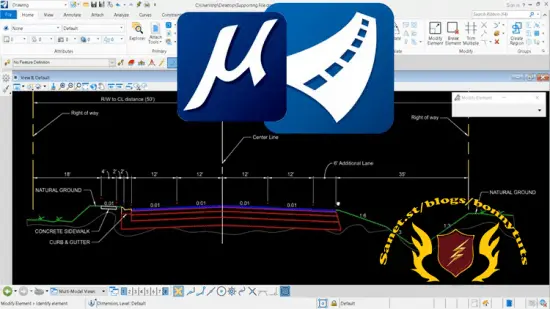
In this course we are going to go through different tools of Bentley Open Roads Designer Connect Edition. This is a software version which combines the legacy star products of Bentley for infraworks: InRoads, GEOPAK and MX.
For this course, we will start with an introduction, over view, keyboard shortcuts and user interface / navigation in Bentley Open Roads Designer Connect Edition. We will learn the difference between Bentley Open Roads and other similar software. We will try to go through few basics to get started.
We will try to cover up horizontal and vertical geometries creation, modification and analyzation concepts, followed by five practice exercises that will include creation of offset geometries, Cul da Sec, End Tapers, Drive Way and Curb Returns.
After horizontal and vertical geometries, we will cover Terrains or Surfaces. We will learn creation of terrains using different methods like creation through ASCII Files, Corridors, Point Cloud Data (. POD Files) and elements etc. After creation, multiple aspects of terrains will be discussed like their modification, editing and analyzation.
Similar to Terrains, different aspects of corridors will be discussed in the later session. It will include the processes involved in creation, edition and modification of corridors and templates for corridors. Finally, there will be a practice exercise that will conclude the Module of Bentley Open Roads course.
Please be noted that there is no hard and fast rule to execute a specific command as there are multiple approaches to create similar output, however, we will try to follow the simplest approach possible to make this course easy and fun to learn for you.
#...
Course content
Getting started
Introduction
Bentley Open Roads vs Autodesk Civil 3D
Getting Started
Keyboard Shortcuts
Geo technical workspace
Accessing gINT database in openroads
Updating borehole properties
Adding Terrain and bore holes
Lithology Cylinders
Borehole Navigation
New Data Set Creation (Depth - Length)
Water Level Data Set Creation (Depth Only)
Create Terrain from Data Set
Create Mesh from Data Set
Create Cross Section & Fence Diagram
Survey workspace
Accessing Survey Workspace
Review & Change Terrain Features
Review & Change Buildings Features
Review & Change End of Gravel Features
Survey Details
Importing ASCII Survey Data
Advance Survey Settings
Drawing production workspace
Single Plan Sheet
Double Plan Sheet
Plan-Profile Sheet
Name boundaries and sheets manager
Rectangular Plan-Profile Sheet
Separating Plan-Profile Sheet from Seed file
Complete Plan Sheet
Access Sheet Index
Labels Placement
Section View Sheet
Drawing workspace
Dimensioning
Text Annotation
Notes Placement
Notes Placement
Adding Labels to Title Block
Adding General Notes to Title Block
Adding Tables to Title Block
Printing models and sheets
Print Model
Print Sheet
Batch print with different print styles
Final project
Road Way Section
Who this course is for
Civil Engineers
Infrastructure designers
BIM Modelers
Microstation users
Architects
Surveyors
Published 08/2022
MP4 | Video: h264, 1280x720 | Audio: AAC, 44.1 KHz, 2 Ch
Genre: eLearning | Language: English + srt | Duration: 42 lectures (2h 53m) | Size: 1.45 GB
Download
🔒 Go Premium to Unlock
Use CONNECT Edition - OpenRoads tool to Microstation civil design
What you'll learn
OpenRoads
Microstation OpenRoads
site, roads and infrastructure advanced design
Printing layouts
Requirements
OpenRoads intermediate level
Description
In this course we are going to go through different tools of Bentley Open Roads Designer Connect Edition. This is a software version which combines the legacy star products of Bentley for infraworks: InRoads, GEOPAK and MX.
For this course, we will start with an introduction, over view, keyboard shortcuts and user interface / navigation in Bentley Open Roads Designer Connect Edition. We will learn the difference between Bentley Open Roads and other similar software. We will try to go through few basics to get started.
We will try to cover up horizontal and vertical geometries creation, modification and analyzation concepts, followed by five practice exercises that will include creation of offset geometries, Cul da Sec, End Tapers, Drive Way and Curb Returns.
After horizontal and vertical geometries, we will cover Terrains or Surfaces. We will learn creation of terrains using different methods like creation through ASCII Files, Corridors, Point Cloud Data (. POD Files) and elements etc. After creation, multiple aspects of terrains will be discussed like their modification, editing and analyzation.
Similar to Terrains, different aspects of corridors will be discussed in the later session. It will include the processes involved in creation, edition and modification of corridors and templates for corridors. Finally, there will be a practice exercise that will conclude the Module of Bentley Open Roads course.
Please be noted that there is no hard and fast rule to execute a specific command as there are multiple approaches to create similar output, however, we will try to follow the simplest approach possible to make this course easy and fun to learn for you.
#...
Course content
Getting started
Introduction
Bentley Open Roads vs Autodesk Civil 3D
Getting Started
Keyboard Shortcuts
Geo technical workspace
Accessing gINT database in openroads
Updating borehole properties
Adding Terrain and bore holes
Lithology Cylinders
Borehole Navigation
New Data Set Creation (Depth - Length)
Water Level Data Set Creation (Depth Only)
Create Terrain from Data Set
Create Mesh from Data Set
Create Cross Section & Fence Diagram
Survey workspace
Accessing Survey Workspace
Review & Change Terrain Features
Review & Change Buildings Features
Review & Change End of Gravel Features
Survey Details
Importing ASCII Survey Data
Advance Survey Settings
Drawing production workspace
Single Plan Sheet
Double Plan Sheet
Plan-Profile Sheet
Name boundaries and sheets manager
Rectangular Plan-Profile Sheet
Separating Plan-Profile Sheet from Seed file
Complete Plan Sheet
Access Sheet Index
Labels Placement
Section View Sheet
Drawing workspace
Dimensioning
Text Annotation
Notes Placement
Notes Placement
Adding Labels to Title Block
Adding General Notes to Title Block
Adding Tables to Title Block
Printing models and sheets
Print Model
Print Sheet
Batch print with different print styles
Final project
Road Way Section
Who this course is for
Civil Engineers
Infrastructure designers
BIM Modelers
Microstation users
Architects
Surveyors
Published 08/2022
MP4 | Video: h264, 1280x720 | Audio: AAC, 44.1 KHz, 2 Ch
Genre: eLearning | Language: English + srt | Duration: 42 lectures (2h 53m) | Size: 1.45 GB
Download
🔒 Go Premium to Unlock