
Blender 2.8 The complete guide from beginner to pro
Last updated 6/2019
[HTML][hidden link]
Description
This is a complete training dedicated to learning the Blender 2.8 software. Blender 2.8 and a free 3D software and opensource.
This complete training will allow beginners to discover the software entierely. Blender 2.7 users will find an opportunity to make the transition to the new version.
This training is divided into 15 chapters that will allow you to progressively and consistently learn. Most of the chapters are punctuated with exercises to review the features covered and implement them. The source files are included in the training and allow you to understand the progress of a project.
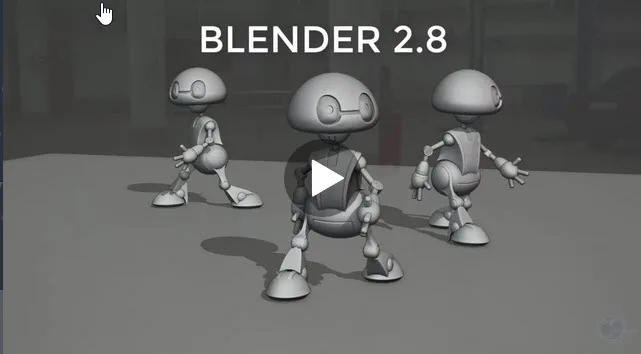
During the training we will produce in parallel a complete project to create a robot from modeling to animation, this project will allow you to apply the Blender functions learned in the course.
From discover ring the software, to polygonal modeling, object mode, edit mode, different rendering engines, scene lighting, realistic material creation, texturing, digital sculpture, animation, simulations, compositing, all these notions will be addressed in this training and will allow you to progress in the software.
Who this course is for:
01. Getting Started with the Software
[01]
Go Premium to Unlock Register Now
[02]
[hidden link]
02. Object mode
[01]
[hidden link]
[02]
[hidden link]
[03]
[hidden link]
03. Edit mode
[01]
[hidden link]
[02]
[hidden link]
[03]
[hidden link]
[04]
[hidden link]
[05]
[hidden link]
[06]
[hidden link]
04. Modifiers
[01]
[hidden link]
[02]
[hidden link]
[03]
[hidden link]
05. Beziers Curves
[01]
[hidden link]
[02]
[hidden link]
06. Render Engines in Blender
[01]
[hidden link]
07. Shaders and Node System
[01]
[hidden link]
[02]
[hidden link]
[03]
[hidden link]
[04]
[hidden link]
08. Lighting and shooting
[01]
[hidden link]
[02]
[hidden link]
[03]
[hidden link]
09. UV mapping
[01]
[hidden link]
[02]
[hidden link]
10. Texture paint mode
[01]
[hidden link]
[02]
[hidden link]
11. The sculpt mode
[01]
[hidden link]
[02]
[hidden link]
[03]
[hidden link]
[04]
[hidden link]
12. The armatures
[01]
[hidden link]
[02]
[hidden link]
[03]
[hidden link]
13. Animation in blender
[01]
[hidden link]
[02]
[hidden link]
14. Simulations
[01]
[hidden link]
[02]
[hidden link]
[03]
[hidden link]
[04]
[hidden link]
[05]
[hidden link]
15. Compositing
[01]
[hidden link]
[02]
[hidden link]
Last updated 6/2019
[HTML][hidden link]
Description
This is a complete training dedicated to learning the Blender 2.8 software. Blender 2.8 and a free 3D software and opensource.
This complete training will allow beginners to discover the software entierely. Blender 2.7 users will find an opportunity to make the transition to the new version.
This training is divided into 15 chapters that will allow you to progressively and consistently learn. Most of the chapters are punctuated with exercises to review the features covered and implement them. The source files are included in the training and allow you to understand the progress of a project.
During the training we will produce in parallel a complete project to create a robot from modeling to animation, this project will allow you to apply the Blender functions learned in the course.
From discover ring the software, to polygonal modeling, object mode, edit mode, different rendering engines, scene lighting, realistic material creation, texturing, digital sculpture, animation, simulations, compositing, all these notions will be addressed in this training and will allow you to progress in the software.
Who this course is for:
- Anyone interested by Blender and open source. From the freelance graphic designer to the company wants to integrate open source.
01. Getting Started with the Software
[01]
Go Premium to Unlock Register Now
[02]
[hidden link]
02. Object mode
[01]
[hidden link]
[02]
[hidden link]
[03]
[hidden link]
03. Edit mode
[01]
[hidden link]
[02]
[hidden link]
[03]
[hidden link]
[04]
[hidden link]
[05]
[hidden link]
[06]
[hidden link]
04. Modifiers
[01]
[hidden link]
[02]
[hidden link]
[03]
[hidden link]
05. Beziers Curves
[01]
[hidden link]
[02]
[hidden link]
06. Render Engines in Blender
[01]
[hidden link]
07. Shaders and Node System
[01]
[hidden link]
[02]
[hidden link]
[03]
[hidden link]
[04]
[hidden link]
08. Lighting and shooting
[01]
[hidden link]
[02]
[hidden link]
[03]
[hidden link]
09. UV mapping
[01]
[hidden link]
[02]
[hidden link]
10. Texture paint mode
[01]
[hidden link]
[02]
[hidden link]
11. The sculpt mode
[01]
[hidden link]
[02]
[hidden link]
[03]
[hidden link]
[04]
[hidden link]
12. The armatures
[01]
[hidden link]
[02]
[hidden link]
[03]
[hidden link]
13. Animation in blender
[01]
[hidden link]
[02]
[hidden link]
14. Simulations
[01]
[hidden link]
[02]
[hidden link]
[03]
[hidden link]
[04]
[hidden link]
[05]
[hidden link]
15. Compositing
[01]
[hidden link]
[02]
[hidden link]


