AI DICOM Reader 1.1.0
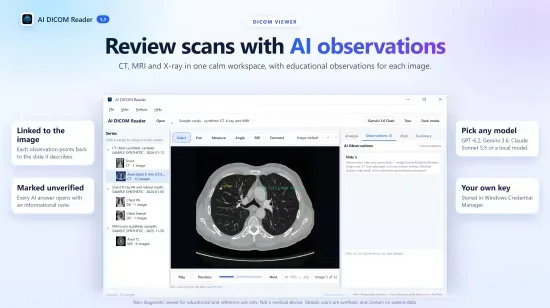
AI DICOM Reader is an advanced DICOM medical imaging viewer and analysis software that enables users to open, explore, and analyze medical imaging files using Vision AI technology. Designed for educational and research purposes, it provides powerful tools for studying CT, MRI, and other medical imaging data.
Featuring an integrated medical image measurement toolkit, users can perform Region of Interest (ROI) analysis, distance measurements, angle calculations, and Hounsfield Unit (HU) density analysis. Its advanced Multi-Planar Reconstruction (MPR) capabilities allow users to navigate and examine volumetric CT and MRI scans across multiple planes in an interactive 3D environment.
Combining AI-powered medical image analysis, DICOM visualization, advanced measurement tools, and 3D imaging capabilities, AI DICOM Reader offers a comprehensive solution for medical imaging education, radiology research, DICOM file viewing, CT and MRI analysis, and biomedical image processing.
Key Features
Advanced DICOM Viewer
Window/Level adjustments (Bone, Lung, Brain presets), pan, zoom, and MPR for 3D volume slicing.
Multi-Model AI Analysis
Connect OpenAI (GPT-4o), Claude, Gemini, OpenRouter, or Ollama for local offline AI analysis.
Measurement Tools
Draw ROI regions, measure distances, angles, and calculate pixel densities (HU/SI).
Privacy Controlled
No telemetry, no cloud sync. You control exactly what data goes to AI APIs.
Report Export
Export AI-generated educational summaries to PDF, DOCX, HTML, or TXT.
DICOM Metadata
Extract and parse hidden DICOM metadata and acquisition tags automatically.
Who Is It For?
Medical Students
Learn to interpret imaging data by testing how AI models read DICOM scans.
AI Researchers
Benchmark vision models against medical imaging formats.
Tech Enthusiasts
Explore DICOM format parsing and AI integration in a desktop app.
Educators
Use as a teaching tool to demonstrate medical imaging concepts.
Release Notes
System Requirements
- Platform: Windows 10 version 17763.0 or higher
- Memory: 4 GB (min), 6 GB (rec)
Languages: English
File Size: 428 MB
Download
🔒 Go Premium to Unlock
AI DICOM Reader is an advanced DICOM medical imaging viewer and analysis software that enables users to open, explore, and analyze medical imaging files using Vision AI technology. Designed for educational and research purposes, it provides powerful tools for studying CT, MRI, and other medical imaging data.
Featuring an integrated medical image measurement toolkit, users can perform Region of Interest (ROI) analysis, distance measurements, angle calculations, and Hounsfield Unit (HU) density analysis. Its advanced Multi-Planar Reconstruction (MPR) capabilities allow users to navigate and examine volumetric CT and MRI scans across multiple planes in an interactive 3D environment.
Combining AI-powered medical image analysis, DICOM visualization, advanced measurement tools, and 3D imaging capabilities, AI DICOM Reader offers a comprehensive solution for medical imaging education, radiology research, DICOM file viewing, CT and MRI analysis, and biomedical image processing.
Key Features
Advanced DICOM Viewer
Window/Level adjustments (Bone, Lung, Brain presets), pan, zoom, and MPR for 3D volume slicing.
Multi-Model AI Analysis
Connect OpenAI (GPT-4o), Claude, Gemini, OpenRouter, or Ollama for local offline AI analysis.
Measurement Tools
Draw ROI regions, measure distances, angles, and calculate pixel densities (HU/SI).
Privacy Controlled
No telemetry, no cloud sync. You control exactly what data goes to AI APIs.
Report Export
Export AI-generated educational summaries to PDF, DOCX, HTML, or TXT.
DICOM Metadata
Extract and parse hidden DICOM metadata and acquisition tags automatically.
Who Is It For?
Medical Students
Learn to interpret imaging data by testing how AI models read DICOM scans.
AI Researchers
Benchmark vision models against medical imaging formats.
Tech Enthusiasts
Explore DICOM format parsing and AI integration in a desktop app.
Educators
Use as a teaching tool to demonstrate medical imaging concepts.
Release Notes
System Requirements
- Platform: Windows 10 version 17763.0 or higher
- Memory: 4 GB (min), 6 GB (rec)
Languages: English
File Size: 428 MB
Download
🔒 Go Premium to Unlock