Remove Tool AI for Adobe Photoshop 2026-2027 (x64) Multilingual
Remove Unwanted Objects and Distractions Instantly with Adobe Photoshop AI Remove Tool
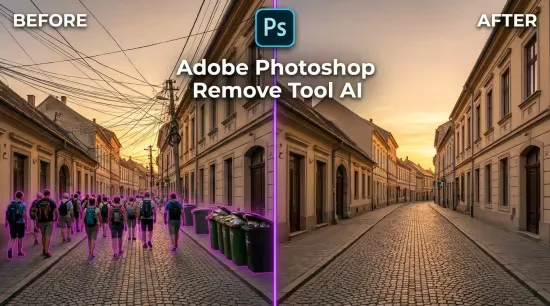
Transform your photos with the powerful AI-powered Remove Tool in Adobe Photoshop, an advanced photo editing and object removal solution that makes professional retouching faster and easier than ever. Effortlessly erase unwanted people, distracting objects, overhead power lines, background clutter, and other imperfections with just a few brush strokes. Photoshop intelligently analyzes the surrounding image and generates realistic replacement details to create clean, natural-looking results.
Key Features of Photoshop AI Remove Tool:
AI Object Removal: Remove unwanted people, objects, signs, wires, and other distractions from photos.
Automatic Distraction Detection: Identify and eliminate common background distractions with minimal effort.
Intelligent Background Reconstruction: Seamlessly fill removed areas with context-aware details for realistic results.
On-Device AI Processing: Use a downloaded local AI model for supported editing operations without requiring an active internet connection.
Fast Photo Retouching: Achieve professional-looking edits without complicated selections or time-consuming manual cloning.
Whether you're a photographer, graphic designer, content creator, or digital artist, Adobe Photoshop AI Remove Tool helps you clean up images, enhance photo quality, and produce polished, distraction-free visuals in seconds.
Whats New
Updates: official site does not provide any info about changes in this version
System Requirements:
Windows 10 - 11 (x64)
• Pre-installed Adobe Photoshop (version 27.7 or later)
• 8-core processor (Intel Rocket Lake or equivalent model)
• 16 GB RAM
• 512 GB of high-speed SSD storage
• Discrete graphics card with at least 8 GB of VRAM (e.g., NVIDIA RTX 3060 or later)
Advanced Hardware Requirements
• NVIDIA GPU: GeForce RTX 30 series or later with at least 14 GB of VRAM
• Intel discrete GPU: Intel Arc GPUs with at least 12 GB of VRAM
• Intel integrated GPU: Arrow Lake, Lunar Lake, or later with at least 32 GB of system RAM
• AMD discrete GPU: AMD RDNA2 or later with at least 23 GB of VRAM
• AMD integrated GPU: AMD RDNA2 or later with at least 64 GB of VRAM
• Drivers: It is recommended to use the latest GPU driver versions; drivers older than 2 years may not be supported
File size: 4.96 GB
Download
🔒 Go Premium to Unlock
Remove Unwanted Objects and Distractions Instantly with Adobe Photoshop AI Remove Tool
Transform your photos with the powerful AI-powered Remove Tool in Adobe Photoshop, an advanced photo editing and object removal solution that makes professional retouching faster and easier than ever. Effortlessly erase unwanted people, distracting objects, overhead power lines, background clutter, and other imperfections with just a few brush strokes. Photoshop intelligently analyzes the surrounding image and generates realistic replacement details to create clean, natural-looking results.
Key Features of Photoshop AI Remove Tool:
AI Object Removal: Remove unwanted people, objects, signs, wires, and other distractions from photos.
Automatic Distraction Detection: Identify and eliminate common background distractions with minimal effort.
Intelligent Background Reconstruction: Seamlessly fill removed areas with context-aware details for realistic results.
On-Device AI Processing: Use a downloaded local AI model for supported editing operations without requiring an active internet connection.
Fast Photo Retouching: Achieve professional-looking edits without complicated selections or time-consuming manual cloning.
Whether you're a photographer, graphic designer, content creator, or digital artist, Adobe Photoshop AI Remove Tool helps you clean up images, enhance photo quality, and produce polished, distraction-free visuals in seconds.
Whats New
Updates: official site does not provide any info about changes in this version
System Requirements:
Windows 10 - 11 (x64)
• Pre-installed Adobe Photoshop (version 27.7 or later)
• 8-core processor (Intel Rocket Lake or equivalent model)
• 16 GB RAM
• 512 GB of high-speed SSD storage
• Discrete graphics card with at least 8 GB of VRAM (e.g., NVIDIA RTX 3060 or later)
Advanced Hardware Requirements
• NVIDIA GPU: GeForce RTX 30 series or later with at least 14 GB of VRAM
• Intel discrete GPU: Intel Arc GPUs with at least 12 GB of VRAM
• Intel integrated GPU: Arrow Lake, Lunar Lake, or later with at least 32 GB of system RAM
• AMD discrete GPU: AMD RDNA2 or later with at least 23 GB of VRAM
• AMD integrated GPU: AMD RDNA2 or later with at least 64 GB of VRAM
• Drivers: It is recommended to use the latest GPU driver versions; drivers older than 2 years may not be supported
File size: 4.96 GB
Download
🔒 Go Premium to Unlock


