3ds Max - Pixamoon Bitmap Tracking Resizing v2.05.02
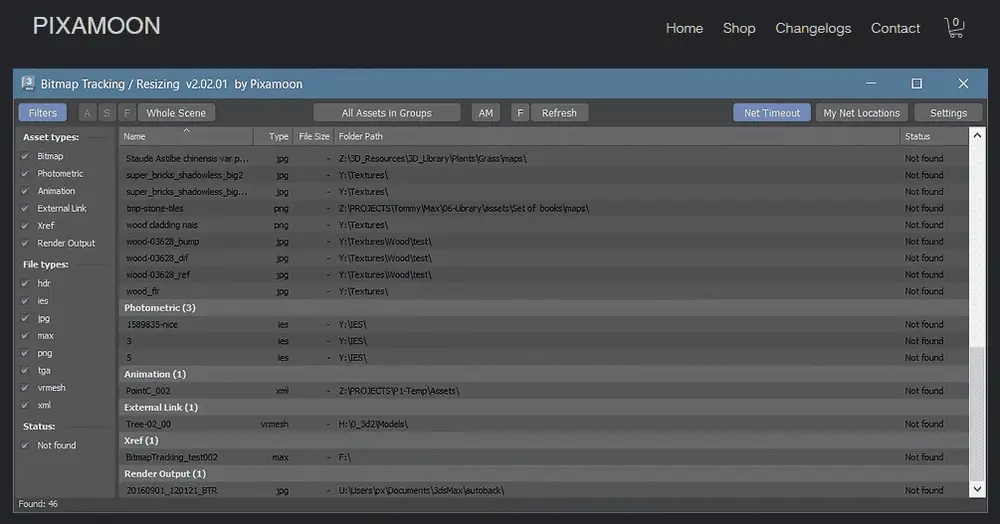
Bitmap Tracking / Resizing v2.00 is an advanced tool for managing scene assets:
• Supports all kinds of assets
• Resize selected bitmaps to:
2K, 1K, 512, 256, 128, or 64 px
and save them to a new folder
• Sort files by:
Name, image width, height, file size, path, gamma, texture name, and status
(Found - network, Found - local, Not found)
• Auto-relink missing assets
• Change / rename paths with:
Path history
Path prefix renaming
Find & replace
Pick new paths
Examples:
Rename:
C:\sample\abc
to:
Z:\3d\sample\abc
• Select objects by selected bitmaps
• Select / show materials by selected bitmaps
(loads materials with selected bitmaps into the material library)
• Copy / collect assets:
Copy local files to network with automatic path replacement
Copy assets to a single folder
Copy assets with original path structure
(similar to Max Archive)
• Shows asset status:
OK - network
Found - local
Not found
• File status displayed in 3 customizable colors
• Supports:
.ifl image sequences
.xml PointCache files
Mari Tiles and
Mudbox Tiles and
• Compatible with most renderers:
VRay, Corona, FStorm, Arnold, RedShift, Octane
• Change gamma for:
jpeg, bmp, gif, tga, tiff
(3ds Max 2014+)
• Change color space in:
VRayHDRI, VRayBitmap, and Arnold Image
• Rename files in scene and on HDD with 5 methods:
Copy with new name on HDD only
Copy with new name + rename in scene
Rename on HDD only
Rename on HDD + in scene
Rename in scene only
• Convert textures to:
JPEG
TIFF
1-bit TIFF (opacity maps)
Tiled TIFF (TX)
Tiled EXR
• Save cropped textures as JPG
(with quality and color settings)
• External Bitmaps Mode:
Drag & drop image files and:
Rename
Resize
Convert to TX / EXR / JPEG / TIFF
2MB
Download
*
Bitmap Tracking / Resizing v2.00 is an advanced tool for managing scene assets:
• Supports all kinds of assets
• Resize selected bitmaps to:
2K, 1K, 512, 256, 128, or 64 px
and save them to a new folder
• Sort files by:
Name, image width, height, file size, path, gamma, texture name, and status
(Found - network, Found - local, Not found)
• Auto-relink missing assets
• Change / rename paths with:
Path history
Path prefix renaming
Find & replace
Pick new paths
Examples:
Rename:
C:\sample\abc
to:
Z:\3d\sample\abc
• Select objects by selected bitmaps
• Select / show materials by selected bitmaps
(loads materials with selected bitmaps into the material library)
• Copy / collect assets:
Copy local files to network with automatic path replacement
Copy assets to a single folder
Copy assets with original path structure
(similar to Max Archive)
• Shows asset status:
OK - network
Found - local
Not found
• File status displayed in 3 customizable colors
• Supports:
.ifl image sequences
.xml PointCache files
Mari Tiles and
Mudbox Tiles and
• Compatible with most renderers:
VRay, Corona, FStorm, Arnold, RedShift, Octane
• Change gamma for:
jpeg, bmp, gif, tga, tiff
(3ds Max 2014+)
• Change color space in:
VRayHDRI, VRayBitmap, and Arnold Image
• Rename files in scene and on HDD with 5 methods:
Copy with new name on HDD only
Copy with new name + rename in scene
Rename on HDD only
Rename on HDD + in scene
Rename in scene only
• Convert textures to:
JPEG
TIFF
1-bit TIFF (opacity maps)
Tiled TIFF (TX)
Tiled EXR
• Save cropped textures as JPG
(with quality and color settings)
• External Bitmaps Mode:
Drag & drop image files and:
Rename
Resize
Convert to TX / EXR / JPEG / TIFF
2MB
Download
*