CADWORX 24
CADWorx 24 – Advanced Plant Design & Piping Engineering Software
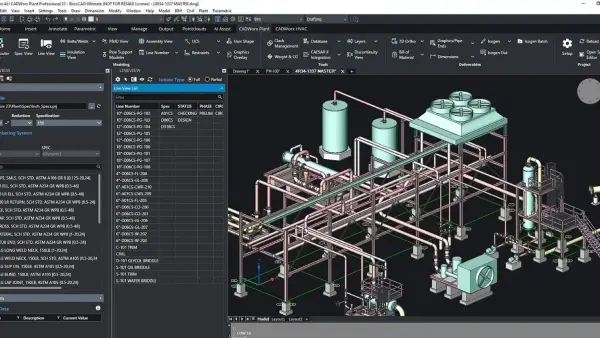
CADWorx 24 is a powerful and industry-leading plant design software developed by Hexagon AB, designed for engineers and designers working in process plants, oil & gas, power, and industrial facilities. This comprehensive CAD-based solution enables the creation of intelligent 2D drawings and highly detailed 3D models for piping systems, equipment, and structural components.
Built on platforms like AutoCAD and BricsCAD, CADWorx 24 delivers seamless integration with familiar CAD environments, allowing users to accelerate design workflows while maintaining accuracy and consistency across projects.
Core Functions & Capabilities
1. Intelligent 3D Plant Modeling
CADWorx 24 enables users to design intelligent 3D plant models with specification-driven components, including piping, equipment, and steel structures. These models are data-rich and dynamically linked to project databases for real-time updates and consistency.
2. Advanced Piping & Equipment Design
The software provides robust tools for piping layout, auto-routing, and component placement. Engineers can easily generate accurate piping systems while ensuring compliance with project specifications and standards.
3. Automatic Isometric Drawings & Documentation
With built-in Isogen technology, CADWorx automatically generates piping isometrics, orthographic drawings, and bills of materials (BOM), reducing manual drafting time and minimizing errors.
4. Integrated Engineering Workflow
CADWorx offers strong integration with analysis tools like CAESAR II and PV Elite, enabling seamless data exchange between design and analysis environments. This ensures accurate validation of piping systems and equipment performance.
5. Structural & Instrumentation Design
The platform includes modules for structural steel modeling and instrumentation design, allowing users to create complete plant layouts including supports, frameworks, and control systems within one environment.
6. Collaboration & Design Review
With tools like CADWorx Design Review, teams can visualize large 3D models, perform clash detection, and collaborate through markups and redlining, improving communication and reducing project delays.
7. Enhanced Performance & User Experience (v24)
Version 24 introduces improvements in user interface, graphics performance, and workflow customization, enabling faster navigation and more efficient handling of large-scale industrial models.
Key Features
Intelligent 2D drafting and 3D plant modeling
Automated isometric generation and BOM reporting
Advanced piping, equipment, and structural design tools
Seamless integration with engineering analysis software
Data-driven design with database connectivity
Clash detection and design validation tools
Compatible with AutoCAD and BricsCAD platforms
Conclusion
CADWorx 24 is a complete and highly efficient plant design solution that empowers engineers to design, analyze, and deliver complex industrial projects with accuracy and speed. With its intelligent modeling capabilities, automation features, and seamless integration with analysis tools, it remains one of the most trusted software platforms in modern plant engineering.
(The experiment was not conducted properly.)
If you'd like to try it, you can download the program with activation.
Please share the result
2.07GB
Download
🔒 Upgrade
CADWorx 24 – Advanced Plant Design & Piping Engineering Software
CADWorx 24 is a powerful and industry-leading plant design software developed by Hexagon AB, designed for engineers and designers working in process plants, oil & gas, power, and industrial facilities. This comprehensive CAD-based solution enables the creation of intelligent 2D drawings and highly detailed 3D models for piping systems, equipment, and structural components.
Built on platforms like AutoCAD and BricsCAD, CADWorx 24 delivers seamless integration with familiar CAD environments, allowing users to accelerate design workflows while maintaining accuracy and consistency across projects.
Core Functions & Capabilities
1. Intelligent 3D Plant Modeling
CADWorx 24 enables users to design intelligent 3D plant models with specification-driven components, including piping, equipment, and steel structures. These models are data-rich and dynamically linked to project databases for real-time updates and consistency.
2. Advanced Piping & Equipment Design
The software provides robust tools for piping layout, auto-routing, and component placement. Engineers can easily generate accurate piping systems while ensuring compliance with project specifications and standards.
3. Automatic Isometric Drawings & Documentation
With built-in Isogen technology, CADWorx automatically generates piping isometrics, orthographic drawings, and bills of materials (BOM), reducing manual drafting time and minimizing errors.
4. Integrated Engineering Workflow
CADWorx offers strong integration with analysis tools like CAESAR II and PV Elite, enabling seamless data exchange between design and analysis environments. This ensures accurate validation of piping systems and equipment performance.
5. Structural & Instrumentation Design
The platform includes modules for structural steel modeling and instrumentation design, allowing users to create complete plant layouts including supports, frameworks, and control systems within one environment.
6. Collaboration & Design Review
With tools like CADWorx Design Review, teams can visualize large 3D models, perform clash detection, and collaborate through markups and redlining, improving communication and reducing project delays.
7. Enhanced Performance & User Experience (v24)
Version 24 introduces improvements in user interface, graphics performance, and workflow customization, enabling faster navigation and more efficient handling of large-scale industrial models.
Key Features
Intelligent 2D drafting and 3D plant modeling
Automated isometric generation and BOM reporting
Advanced piping, equipment, and structural design tools
Seamless integration with engineering analysis software
Data-driven design with database connectivity
Clash detection and design validation tools
Compatible with AutoCAD and BricsCAD platforms
Conclusion
CADWorx 24 is a complete and highly efficient plant design solution that empowers engineers to design, analyze, and deliver complex industrial projects with accuracy and speed. With its intelligent modeling capabilities, automation features, and seamless integration with analysis tools, it remains one of the most trusted software platforms in modern plant engineering.
(The experiment was not conducted properly.)
If you'd like to try it, you can download the program with activation.
Please share the result
2.07GB
Download
🔒 Upgrade


