Architectural Design & Animation in Blender
Ultimate Guide to 3D Modelling, Design & Animation for Architectural Projects in Blender
What you'll learn
Master 3D modelling, lighting, and animation in Blender from the ground up.
Command the techniques to create a full house construction animation with confidence.
Work smarter with time-saving shortcuts and workflows in Blender and FreeCAD.
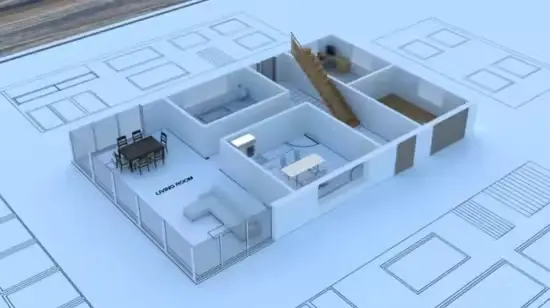
Build a detailed, animation-ready 3D house that stands out.
Control lighting like a pro with real-world environmental effects.
Draft precise 2D designs in CAD software to fuel your 3D creations.
Use the Archimesh add-on to craft architectural elements quickly and flawlessly.
Requirements
A computer that can run Blender 4 or higher (see Blender’s official system requirements for details).
No prior 3D or Blender experience—just a willingness to learn!
Description
Unlock the power of architectural animation with *Architectural Design & Animation in Blender — your fast track to creating stunning 3D models, lighting, and animations using Blender, the leading free, open-source 3D software. Ditch costly tools like Maya or 3ds Max and learn to deliver professional-grade results with this top-rated Udemy course.Trusted by thousands of learners, this beginner-friendly course takes you from zero to hero, guiding you through hands-on video tutorials to build a jaw-dropping house construction animation. With expert-led lessons, you’ll master Blender’s tools and workflows to bring architectural visions to life in 2025.Why this course stands out:- Learn from a top instructor with nearly 100,000 students.- Beginner-friendly: No 3D experience needed to start.- Master Blender 4.x, the latest release, for cutting-edge results.- Save time with pro shortcuts and insider techniques.- Create precise, professional designs with ease.- Perfect for aspiring 3D artists, architects, or animators.
Topics Covered in the course
What is unit scale in Blender How to work using Metric or Imperial Importing the DXF file Scaling to the correct dimensions Converting to Mesh Objects Snapping the 3D Cursor Rotating using the 3D cursor Separating Edges Merging Vertices Limited Dissolve Duplicate and Separate Extrude Geometry Solidify Modifier Modify Geometry Apply Modifiers Manage Visibility Extrude Geometry Solidify Modifier The Archimesh Add-on Door Configuration Parenting Relationships Creating External Doors Door Customization Window Addition Duplication Technique Parameter Customization Window Panel Configuration Precision Snapping Efficient Duplication Manual Adjustment Stairs Creation Dimension Adjustment View Manipulation Extruding the Ceiling Subtracting the Stairs Opening Edge Loop Usage Floor Creation Object Duplication Dimension Adjustment Roof Creation Geometry Editing Pillar Extrusion Railing Installation Object Merging Step Creation Environment Setup Precision Editing Geometry Editing Modifier Usage Precision Positioning Asset Library Setup HDRI Assets Import Materials Node Setup Asset Management Procedural Lighting HDRI Integration Node Configuration UV Mapping Material Assignment Node Adjustment UV Mapping Material Creation Adding a Concrete Material to the Sill Adding a Door Material Linking UV Maps Seams from Islands Apply Transforms UV Unwrapping Material Assignment Particle Systems Proportional Editing Material Linking Grass Asset Particle System Management Tree Asset Integration Parenting Objects Apply Transforms Applying Modifiers Combing Objects Boolean Subtraction Fixing Issues Select by Type Select Linked Select Pattern Object Combination Parenting and Hierarchy Images as Planes Curve Modifier Usage Spiral Control Setup Plan Animation Boolean Subtraction Camera Animation Techniques Viewport Navigation Constraint Setup Track to Constraint Follow Path Constraint Object Parenting Hide/Unhide Objects Animation Setup Key frame Animation Bezier Interpolation Frame Rate Management Camera Setup Keyframe Application Animation Control Camera Animation Setup Boolean Animation Object Movement Control Revealing the First Floors Keyframing Object Manipulation Animation Sequencing Keyframe Efficiency Object Manipulation Camera Dynamics Object Interaction Tree Animation Setup Parent-Child Relationship Boolean Operations Snap Point Asset Integration Scene Composition Viewport Rendering Animation Review Material Management Viewport Render Review Render Setup Optimization Cycles Render Setup Denoising Application Render Sequencing Geometry NodesPost-Rendering Process Video Editing Workflow Frame Adjustment Final Video Rendering Tools you’ll master:- Blender 4.x: The free, open-source 3D animation powerhouse.- FreeCAD: Draft accurate 2D designs effortlessly.- Archimesh Add-on: Build architectural elements instantly.By the end, you’ll have the skills to design, model, and animate architectural masterpieces in Blender—ideal for 3D artists, architectural designers, or beginners ready to create standout projects. Enroll now and start crafting your first show-stopping animation today!
Who this course is for
Students craving animation to elevate their architectural projects.
Professionals seeking a free, open-source tool for standout designs.
Architects demanding precision in their 3D models and workflows.
Artists eager to expand their creative arsenal with 3D skills.
Designers and visualization learners ready to shine.
Beginners determined to succeed in 3D modelling and animation.
Innovators who want to craft unique, eye-catching 3D models.
Designers needing rapid iteration to perfect their concepts.
Blender users hungry for faster, smarter techniques.
Total newcomers who’ve never touched 3D software—start here!
Last updated 11/2025
MP4 | Video: h264, 1280x720 | Audio: AAC, 44.1 KHz, 2 Ch
Language: English | Duration: 8h 10m | Size: 5.42 GB
Download
🔒 Upgrade
Ultimate Guide to 3D Modelling, Design & Animation for Architectural Projects in Blender
What you'll learn
Master 3D modelling, lighting, and animation in Blender from the ground up.
Command the techniques to create a full house construction animation with confidence.
Work smarter with time-saving shortcuts and workflows in Blender and FreeCAD.
Build a detailed, animation-ready 3D house that stands out.
Control lighting like a pro with real-world environmental effects.
Draft precise 2D designs in CAD software to fuel your 3D creations.
Use the Archimesh add-on to craft architectural elements quickly and flawlessly.
Requirements
A computer that can run Blender 4 or higher (see Blender’s official system requirements for details).
No prior 3D or Blender experience—just a willingness to learn!
Description
Unlock the power of architectural animation with *Architectural Design & Animation in Blender — your fast track to creating stunning 3D models, lighting, and animations using Blender, the leading free, open-source 3D software. Ditch costly tools like Maya or 3ds Max and learn to deliver professional-grade results with this top-rated Udemy course.Trusted by thousands of learners, this beginner-friendly course takes you from zero to hero, guiding you through hands-on video tutorials to build a jaw-dropping house construction animation. With expert-led lessons, you’ll master Blender’s tools and workflows to bring architectural visions to life in 2025.Why this course stands out:- Learn from a top instructor with nearly 100,000 students.- Beginner-friendly: No 3D experience needed to start.- Master Blender 4.x, the latest release, for cutting-edge results.- Save time with pro shortcuts and insider techniques.- Create precise, professional designs with ease.- Perfect for aspiring 3D artists, architects, or animators.
Topics Covered in the course
What is unit scale in Blender How to work using Metric or Imperial Importing the DXF file Scaling to the correct dimensions Converting to Mesh Objects Snapping the 3D Cursor Rotating using the 3D cursor Separating Edges Merging Vertices Limited Dissolve Duplicate and Separate Extrude Geometry Solidify Modifier Modify Geometry Apply Modifiers Manage Visibility Extrude Geometry Solidify Modifier The Archimesh Add-on Door Configuration Parenting Relationships Creating External Doors Door Customization Window Addition Duplication Technique Parameter Customization Window Panel Configuration Precision Snapping Efficient Duplication Manual Adjustment Stairs Creation Dimension Adjustment View Manipulation Extruding the Ceiling Subtracting the Stairs Opening Edge Loop Usage Floor Creation Object Duplication Dimension Adjustment Roof Creation Geometry Editing Pillar Extrusion Railing Installation Object Merging Step Creation Environment Setup Precision Editing Geometry Editing Modifier Usage Precision Positioning Asset Library Setup HDRI Assets Import Materials Node Setup Asset Management Procedural Lighting HDRI Integration Node Configuration UV Mapping Material Assignment Node Adjustment UV Mapping Material Creation Adding a Concrete Material to the Sill Adding a Door Material Linking UV Maps Seams from Islands Apply Transforms UV Unwrapping Material Assignment Particle Systems Proportional Editing Material Linking Grass Asset Particle System Management Tree Asset Integration Parenting Objects Apply Transforms Applying Modifiers Combing Objects Boolean Subtraction Fixing Issues Select by Type Select Linked Select Pattern Object Combination Parenting and Hierarchy Images as Planes Curve Modifier Usage Spiral Control Setup Plan Animation Boolean Subtraction Camera Animation Techniques Viewport Navigation Constraint Setup Track to Constraint Follow Path Constraint Object Parenting Hide/Unhide Objects Animation Setup Key frame Animation Bezier Interpolation Frame Rate Management Camera Setup Keyframe Application Animation Control Camera Animation Setup Boolean Animation Object Movement Control Revealing the First Floors Keyframing Object Manipulation Animation Sequencing Keyframe Efficiency Object Manipulation Camera Dynamics Object Interaction Tree Animation Setup Parent-Child Relationship Boolean Operations Snap Point Asset Integration Scene Composition Viewport Rendering Animation Review Material Management Viewport Render Review Render Setup Optimization Cycles Render Setup Denoising Application Render Sequencing Geometry NodesPost-Rendering Process Video Editing Workflow Frame Adjustment Final Video Rendering Tools you’ll master:- Blender 4.x: The free, open-source 3D animation powerhouse.- FreeCAD: Draft accurate 2D designs effortlessly.- Archimesh Add-on: Build architectural elements instantly.By the end, you’ll have the skills to design, model, and animate architectural masterpieces in Blender—ideal for 3D artists, architectural designers, or beginners ready to create standout projects. Enroll now and start crafting your first show-stopping animation today!
Who this course is for
Students craving animation to elevate their architectural projects.
Professionals seeking a free, open-source tool for standout designs.
Architects demanding precision in their 3D models and workflows.
Artists eager to expand their creative arsenal with 3D skills.
Designers and visualization learners ready to shine.
Beginners determined to succeed in 3D modelling and animation.
Innovators who want to craft unique, eye-catching 3D models.
Designers needing rapid iteration to perfect their concepts.
Blender users hungry for faster, smarter techniques.
Total newcomers who’ve never touched 3D software—start here!
Last updated 11/2025
MP4 | Video: h264, 1280x720 | Audio: AAC, 44.1 KHz, 2 Ch
Language: English | Duration: 8h 10m | Size: 5.42 GB
Download
🔒 Upgrade