ArcGIS Pro - 3D Modeling using ArcGIS 10 and ArcGIS Pro
3D data, city modeling, 3D analyisis and BIM GIS interaction
What you'll learn:
3D Analyisis
City modeling
ArcGIS Pro and ArcGIS 10 functionalities for 3D analyisis
BIM - GIS interaction
Requirements:
ArcGIS pro basic
Description:
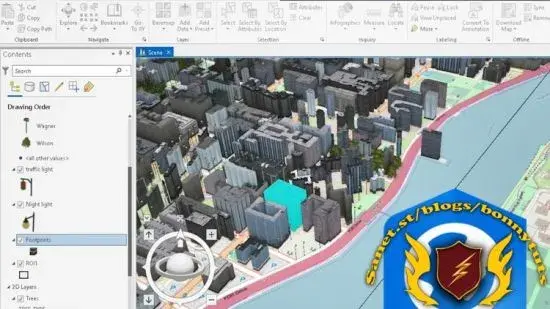
This is a course for third-dimensional geo spatial analysis enthusiasts.ArcGIS is one of the most used platforms worldwide for managing GIS data. In this course, we will explore 3D functions for handling, analyzing, editing data and even interacting with BIM infrastructure modeling data.
Already the maps are not only displayed in 2D, there is a need to see beyond, and even the relationship of structures or phenomena with their environment. 3D data modeling allows a better appreciation of what is happening or how to further improve the spaces, it provides a comprehensive and visually understandable analysis for everyone If you have knowledge in the operation and handling of 2D GIS data in ArcGIS, this course will help you delve into 3D data modeling and use the most suitable tools to build efficient projects.
We must emphasize that to get the most out of this course, we recommend you check out our ArcGIS Pro Basic and Advanced #... courses, as this one focuses on 3D content. For ease of use, some lessons show how ArcGIS 10 works since managing data is much easier than with ArcGIS Pro.
Course content includes:
We hope you enjoy the course.
The basics Definition of 3d Analyst Preparing 2D data In Desktop Opening Arcgis pro/Linking folder do pening blank scene3d visualization3D visualization optionsArcGlobeArcScene3D Symbology, Editing and Animation ArcGIS Pro Demonstration 3D data management 3D Geo processing Data processing/modification Advanced visualization and 3D data editing Advance Visualization / Clustering Creating/Modifying 3D buildings in 3D Changing 3D attribute for Extrusion Identifying Features on Base map Other visualization choices Visualization of new objects View shade on the 3D environment Building information modeling for 3D GIS inter opera bility Introduction to BIM Preparing BIM data Exploring BIM Data BIM layer controls Final Visualization In addition to the previous information, we have included at the end an introductory lesson to the BIM methodology that is important in this 4th digital age.
ArcGIS as an integral platform has allowed the management of BIM data in IFC (Industry Foundation Classes) and Autodesk Revit (RVT) formats. BIM data are also GIS data sources that must be associated with a coordinate system, that is, have location specifications in order to be displayed in ArcGIS Pro, and are read as poly line, point, or multi patch features.#... To get the most out of this course, we recommend you check out our ArcGIS Pro Basic and Advanced #... courses, as this one focuses on 3D content.
For ease of use, some lessons show how ArcGIS 10 works since managing data is much easier than with ArcGIS Pro.
Who this course is for:
GIS users
Geospatial enthusiasts
ArcGIS users
Geomatic, engineering, architecture and land management users
Last updated 12/2022
Created by ... Academy,Golgi Alvarez
MP4 | Video: h264, 1280x720 | Audio: AAC, 44.1 KHz, 2 Ch
Genre: eLearning | Language: English + srt | Duration: 10 Lectures ( 3h 17m ) | Size: 2.30 GB
Download
*
3D data, city modeling, 3D analyisis and BIM GIS interaction
What you'll learn:
3D Analyisis
City modeling
ArcGIS Pro and ArcGIS 10 functionalities for 3D analyisis
BIM - GIS interaction
Requirements:
ArcGIS pro basic
Description:
This is a course for third-dimensional geo spatial analysis enthusiasts.ArcGIS is one of the most used platforms worldwide for managing GIS data. In this course, we will explore 3D functions for handling, analyzing, editing data and even interacting with BIM infrastructure modeling data.
Already the maps are not only displayed in 2D, there is a need to see beyond, and even the relationship of structures or phenomena with their environment. 3D data modeling allows a better appreciation of what is happening or how to further improve the spaces, it provides a comprehensive and visually understandable analysis for everyone If you have knowledge in the operation and handling of 2D GIS data in ArcGIS, this course will help you delve into 3D data modeling and use the most suitable tools to build efficient projects.
We must emphasize that to get the most out of this course, we recommend you check out our ArcGIS Pro Basic and Advanced #... courses, as this one focuses on 3D content. For ease of use, some lessons show how ArcGIS 10 works since managing data is much easier than with ArcGIS Pro.
Course content includes:
We hope you enjoy the course.
The basics Definition of 3d Analyst Preparing 2D data In Desktop Opening Arcgis pro/Linking folder do pening blank scene3d visualization3D visualization optionsArcGlobeArcScene3D Symbology, Editing and Animation ArcGIS Pro Demonstration 3D data management 3D Geo processing Data processing/modification Advanced visualization and 3D data editing Advance Visualization / Clustering Creating/Modifying 3D buildings in 3D Changing 3D attribute for Extrusion Identifying Features on Base map Other visualization choices Visualization of new objects View shade on the 3D environment Building information modeling for 3D GIS inter opera bility Introduction to BIM Preparing BIM data Exploring BIM Data BIM layer controls Final Visualization In addition to the previous information, we have included at the end an introductory lesson to the BIM methodology that is important in this 4th digital age.
ArcGIS as an integral platform has allowed the management of BIM data in IFC (Industry Foundation Classes) and Autodesk Revit (RVT) formats. BIM data are also GIS data sources that must be associated with a coordinate system, that is, have location specifications in order to be displayed in ArcGIS Pro, and are read as poly line, point, or multi patch features.#... To get the most out of this course, we recommend you check out our ArcGIS Pro Basic and Advanced #... courses, as this one focuses on 3D content.
For ease of use, some lessons show how ArcGIS 10 works since managing data is much easier than with ArcGIS Pro.
Who this course is for:
GIS users
Geospatial enthusiasts
ArcGIS users
Geomatic, engineering, architecture and land management users
Last updated 12/2022
Created by ... Academy,Golgi Alvarez
MP4 | Video: h264, 1280x720 | Audio: AAC, 44.1 KHz, 2 Ch
Genre: eLearning | Language: English + srt | Duration: 10 Lectures ( 3h 17m ) | Size: 2.30 GB
Download
*

