Digital Hybrids
This is our original course on clinical and lab workflows for AOX. This is when we designed thimble frames (from Pekton to titanium) with individual crowns and finished them with Anaxgum. This is pre-photogrammetry as well. If you are interested in our current digital workflows, please check out our EASY AOX courses, both SURGERY and RESTORATIVE!!
EASY AOX - SURGERY
EASY AOX - RESTORATIVE
In this course though, you will learn how to treatment plan AND design full arch prostheses in a way that will allow you to treat with ANY material you like. We will teach you how to combine multiple types of materials to suit your needs for your patients/docs with simple, easy to design CAD cases using the powerful Exocad CAD software.
Full arch implant rehabilitations require precision, attention to detail, and efficiency in order to pull them off accurately with longevity. Many of us have restored these with metal frames, acrylic teeth, and denture acrylics. Those of you that have, have you seen what they look like in a matter of just a few years? Are patients frustrated when they bust teeth off their new and expensive prosthesis?
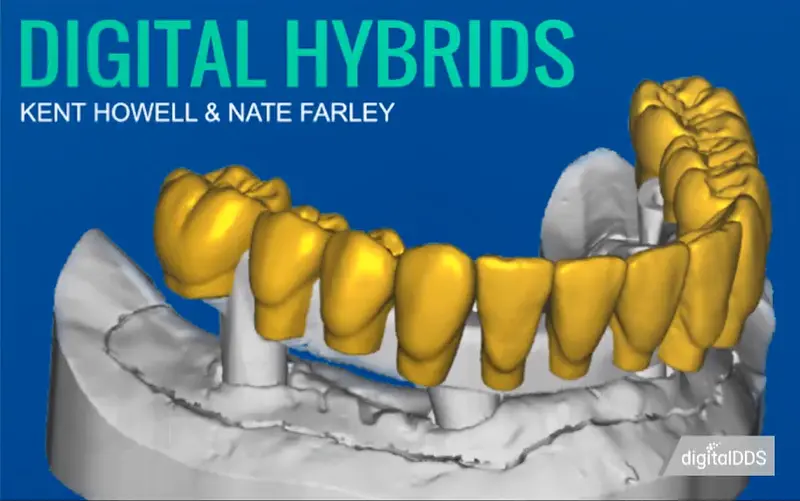
This is an immersion in full arch treatment planning and execution of these prostheses with hands-on CAD DESIGN WITH EXOCAD. Learn why you should consider stepping away from the traditional metal-acrylic hybrids and expand your vision with other materials in the boom of digital dentistry. We will cover the new emerging materials being used as a non-metal alternative (e.g. Pekkton, Trinia, Trilor, etc.) for hybrid frameworks.
Learn how to design the wax up, the wear-home try-ins, and the finals digitally in Exocad (dental design software) before learning the ins and outs of printing and milling through this entire process.
We are a tandem of prosthodontists who have dedicated their practice to striving for a digital workflow for their patients. Immerse yourself in the answers to the questions that have plagued your mind in wanting to provide this treatment in a more predictable fashion for your patients. During this packed 2-day course, you can expect to experience the following:
- History of hybrids and an overview on how it's been done since Branemark's initial designs
- Treatment planning – How, why, what, how many?
- Clinical steps for pre-operative planning and success
- How to utilize digital impression techniques in planning & executing your interim prostheses
- Immediate load & conversion prostheses
- Occlusal scheme planning for interims vs. finals
- Digital workflows for designing the prosthetics in Exocad
- Step-by-step instructions for final restorations
- How many appointments?
- What materials?
- What techniques?
- Patient management tricks?
- Utilizing the interims for final prosthesis design
- Framework design
- Crown materials
- HANDS ON CAD designing in EXOCAD with DEMO SOFTWARE PROVIDED FOR YOU.
REQUIRED ITEMS:
LAPTOP (Fast & Beefy) with at least 16GB RAM and 1070 Video Card
Windows OS (windows 10 preferable)
Mouse for designing, cannot rely on track pad on laptop
Extension cord (optional)
Team Viewer (free software) (teamviewer.com) Choose the personal use option.
References
Metal-free implant-supported single-tooth restorations. Part II: Hybrid abutment crowns and material selection
*
The Metal-Zirconia Implant Fixed Hybrid Full-Arch Prosthesis: An Alternative Technique for Fabrication
*
Concepts for designing and fabricating metal implant frameworks for hybrid implant prostheses
*
Fully digital workflow, integrating dental scan, smile design and CAD-CAM: case report
*
Digital Workflows in the Management of the Esthetically Discriminating Patient
*
Duration
14h 45m 12s
Course Files
Digital_Hybrids.pdf 13843.118 Kb
Forms.zip 262.482 Kb
STL_files.zip 151981.087 Kb
Contents
Some Basics
Introduction to Edentulous Options
1h 32s
Introduction to Edentulous Options.mp4 142882803 Bytes
Design Considerations
46m 01s
Design Considerations.mp4 132140892 Bytes
Materials - Part 1
1h 5m 18s
Materials - Part 1.mp4 129380618 Bytes
Materials - Part 2
31m 39s
Materials - Part 2.mp4 59477838 Bytes
Case Presentations
10m 34s
Case Presentations.mp4 30825348 Bytes
DIGITAL HYBRIDS: Records to Try-in
Starting with an Edentulous Arch
22m 27s
Starting with an Edentulous Arch.mp4 91826890 Bytes
Starting with an Interim Hybrid
18m 36s
Starting with an Interim Hybrid.mp4 38830092 Bytes
Scanning
21m 53s
Scanning.mp4 44109521 Bytes
Designing the Try-in
1h 5m 27s
Designing the Try-in.mp4 180599893 Bytes
LIVE: Try-in Design (Part 1)
59m 23s
LIVE: Try-in Design (Part 1).mp4 300800466 Bytes
LIVE: Try-in Design (Part 2)
1h 7m 27s
LIVE: Try-in Design (Part 2).mp4 369761133 Bytes
Printing the Try-in
53m 17s
Printing the Try-in.mp4 168311398 Bytes
DIGITAL HYBRIDS: Designing the Final
Thimble Framework
18m 57s
Thimble Framework.mp4 93958680 Bytes
Wrapped Bar Framework
17m 16s
Wrapped Bar Framework.mp4 43003420 Bytes
LIVE: Wrapped Bar Design
58m 08s
LIVE: Wrapped Bar Design.mp4 429223559 Bytes
Milling the Framework
11m 10s
Milling the Framework.mp4 34583037 Bytes
Removing & Finishing the Framework
21m 19s
Removing & Finishing the Framework.mp4 71696924 Bytes
Designing Individual Crowns
16m 53s
Designing Individual Crowns.mp4 64512180 Bytes
Milling the Crowns
8m 45s
Milling the Crowns.mp4 34065545 Bytes
Designing the Wrapped Bar Teeth
28m 57s
Designing the Wrapped Bar Teeth.mp4 112386526 Bytes
LIVE: Wrapped Teeth Design
1h 3m 05s
LIVE: Wrapped Teeth Design.mp4 411170297 Bytes
Finishing the Hybrid
Final Try-in
11m 36s
Final Try-in.mp4 47604659 Bytes
Cementing Crowns
6m 49s
Cementing Crowns.mp4 31779489 Bytes
Pink Composite
25m 04s
Pink Composite.mp4 162157986 Bytes
Final Insert
7m 33s
Final Insert.mp4 18652077 Bytes
Adding Pink Composite (Example) - Part 1
35m 20s
Adding Pink Composite (Example) - Part 1.mp4 516242164 Bytes
Adding Pink Composite (Example) - Part 2
31m 46s
Adding Pink Composite (Example) - Part 2.mp4 476702810 Bytes
Overview
Author
Kent Howell and Nate Farley
Released Jan 25th, 2019
Digital Hybrids
Kent Howell and Nate Farley
$1,000.00
4.2GB
Download
*
This is our original course on clinical and lab workflows for AOX. This is when we designed thimble frames (from Pekton to titanium) with individual crowns and finished them with Anaxgum. This is pre-photogrammetry as well. If you are interested in our current digital workflows, please check out our EASY AOX courses, both SURGERY and RESTORATIVE!!
EASY AOX - SURGERY
EASY AOX - RESTORATIVE
In this course though, you will learn how to treatment plan AND design full arch prostheses in a way that will allow you to treat with ANY material you like. We will teach you how to combine multiple types of materials to suit your needs for your patients/docs with simple, easy to design CAD cases using the powerful Exocad CAD software.
Full arch implant rehabilitations require precision, attention to detail, and efficiency in order to pull them off accurately with longevity. Many of us have restored these with metal frames, acrylic teeth, and denture acrylics. Those of you that have, have you seen what they look like in a matter of just a few years? Are patients frustrated when they bust teeth off their new and expensive prosthesis?
This is an immersion in full arch treatment planning and execution of these prostheses with hands-on CAD DESIGN WITH EXOCAD. Learn why you should consider stepping away from the traditional metal-acrylic hybrids and expand your vision with other materials in the boom of digital dentistry. We will cover the new emerging materials being used as a non-metal alternative (e.g. Pekkton, Trinia, Trilor, etc.) for hybrid frameworks.
Learn how to design the wax up, the wear-home try-ins, and the finals digitally in Exocad (dental design software) before learning the ins and outs of printing and milling through this entire process.
We are a tandem of prosthodontists who have dedicated their practice to striving for a digital workflow for their patients. Immerse yourself in the answers to the questions that have plagued your mind in wanting to provide this treatment in a more predictable fashion for your patients. During this packed 2-day course, you can expect to experience the following:
- History of hybrids and an overview on how it's been done since Branemark's initial designs
- Treatment planning – How, why, what, how many?
- Clinical steps for pre-operative planning and success
- How to utilize digital impression techniques in planning & executing your interim prostheses
- Immediate load & conversion prostheses
- Occlusal scheme planning for interims vs. finals
- Digital workflows for designing the prosthetics in Exocad
- Step-by-step instructions for final restorations
- How many appointments?
- What materials?
- What techniques?
- Patient management tricks?
- Utilizing the interims for final prosthesis design
- Framework design
- Crown materials
- HANDS ON CAD designing in EXOCAD with DEMO SOFTWARE PROVIDED FOR YOU.
REQUIRED ITEMS:
LAPTOP (Fast & Beefy) with at least 16GB RAM and 1070 Video Card
Windows OS (windows 10 preferable)
Mouse for designing, cannot rely on track pad on laptop
Extension cord (optional)
Team Viewer (free software) (teamviewer.com) Choose the personal use option.
References
Metal-free implant-supported single-tooth restorations. Part II: Hybrid abutment crowns and material selection
*
The Metal-Zirconia Implant Fixed Hybrid Full-Arch Prosthesis: An Alternative Technique for Fabrication
*
Concepts for designing and fabricating metal implant frameworks for hybrid implant prostheses
*
Fully digital workflow, integrating dental scan, smile design and CAD-CAM: case report
*
Digital Workflows in the Management of the Esthetically Discriminating Patient
*
Duration
14h 45m 12s
Course Files
Digital_Hybrids.pdf 13843.118 Kb
Forms.zip 262.482 Kb
STL_files.zip 151981.087 Kb
Contents
Some Basics
Introduction to Edentulous Options
1h 32s
Introduction to Edentulous Options.mp4 142882803 Bytes
Design Considerations
46m 01s
Design Considerations.mp4 132140892 Bytes
Materials - Part 1
1h 5m 18s
Materials - Part 1.mp4 129380618 Bytes
Materials - Part 2
31m 39s
Materials - Part 2.mp4 59477838 Bytes
Case Presentations
10m 34s
Case Presentations.mp4 30825348 Bytes
DIGITAL HYBRIDS: Records to Try-in
Starting with an Edentulous Arch
22m 27s
Starting with an Edentulous Arch.mp4 91826890 Bytes
Starting with an Interim Hybrid
18m 36s
Starting with an Interim Hybrid.mp4 38830092 Bytes
Scanning
21m 53s
Scanning.mp4 44109521 Bytes
Designing the Try-in
1h 5m 27s
Designing the Try-in.mp4 180599893 Bytes
LIVE: Try-in Design (Part 1)
59m 23s
LIVE: Try-in Design (Part 1).mp4 300800466 Bytes
LIVE: Try-in Design (Part 2)
1h 7m 27s
LIVE: Try-in Design (Part 2).mp4 369761133 Bytes
Printing the Try-in
53m 17s
Printing the Try-in.mp4 168311398 Bytes
DIGITAL HYBRIDS: Designing the Final
Thimble Framework
18m 57s
Thimble Framework.mp4 93958680 Bytes
Wrapped Bar Framework
17m 16s
Wrapped Bar Framework.mp4 43003420 Bytes
LIVE: Wrapped Bar Design
58m 08s
LIVE: Wrapped Bar Design.mp4 429223559 Bytes
Milling the Framework
11m 10s
Milling the Framework.mp4 34583037 Bytes
Removing & Finishing the Framework
21m 19s
Removing & Finishing the Framework.mp4 71696924 Bytes
Designing Individual Crowns
16m 53s
Designing Individual Crowns.mp4 64512180 Bytes
Milling the Crowns
8m 45s
Milling the Crowns.mp4 34065545 Bytes
Designing the Wrapped Bar Teeth
28m 57s
Designing the Wrapped Bar Teeth.mp4 112386526 Bytes
LIVE: Wrapped Teeth Design
1h 3m 05s
LIVE: Wrapped Teeth Design.mp4 411170297 Bytes
Finishing the Hybrid
Final Try-in
11m 36s
Final Try-in.mp4 47604659 Bytes
Cementing Crowns
6m 49s
Cementing Crowns.mp4 31779489 Bytes
Pink Composite
25m 04s
Pink Composite.mp4 162157986 Bytes
Final Insert
7m 33s
Final Insert.mp4 18652077 Bytes
Adding Pink Composite (Example) - Part 1
35m 20s
Adding Pink Composite (Example) - Part 1.mp4 516242164 Bytes
Adding Pink Composite (Example) - Part 2
31m 46s
Adding Pink Composite (Example) - Part 2.mp4 476702810 Bytes
Overview
Author
Kent Howell and Nate Farley
Released Jan 25th, 2019
Digital Hybrids
Kent Howell and Nate Farley
$1,000.00
Code:
https://digitaldds.com/course/digital-hybrids-RU0GAovCrinN
4.2GB
Download
*