River and Flood Modeling with HEC-RAS - ...
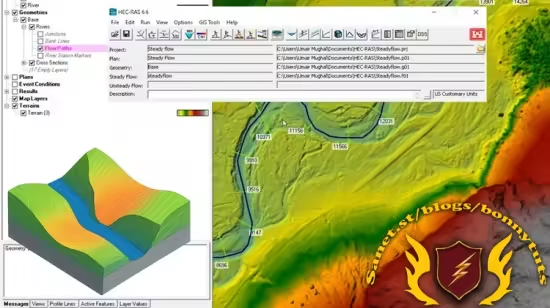
Intro to HEC-RAS: create terrain, define river geometry, and simulate steady flow step-by-step with real examples.
What you'll learn
How to Install and Navigate HEC-RAS
Create RAS Terrain Using Various Data Sources
Modify Terrain and Define River Geometry
Build and Edit Complete Geometric Models
Set Up and Simulate Steady Flow Conditions
Analyze and Refine Hydraulic Models
Apply Real-World Hydraulic Modeling Techniques
Requirements
No prior experience with HEC-RAS is necessary
Basic knowledge of hydrology or civil engineering is helpful but not required
Description
This course is the first part of a comprehensive HEC-RAS learning path, focused on giving students a solid foundation in terrain-based hydraulic modeling. Designed for beginners, the course introduces the core components of HEC-RAS, a powerful free software developed by the U.S. Army Corps of Engineers for simulating water surface profiles in natural and constructed channels.
Throughout this course, students will move step-by-step from installing the software to creating their first steady flow model, using real terrain data and intuitive tools. Each section builds progressively, helping learners develop both practical skills and conceptual understanding.
What You’ll Learn
How to install and set up HEC-RAS on your computer
How to start a new project and navigate the HEC-RAS interface
How to generate RAS terrain models from various data sources, including USGS datasets
How to modify the terrain and define essential river geometry elements
How to lay out and edit cross sections for flow analysis
How to input steady flow data and simulate basic hydraulic conditions
How to analyze results and refine your model for improved accuracy Course Structure
Section 1: Introduction and Software SetupGet familiar with HEC-RAS, install it correctly, and start your first project.
Section 2: Creating and Importing RAS TerrainBuild accurate terrain models from multiple data sources for use in hydraulic simulations.
Section 3: Terrain and Channel Geometry EditingDefine rivers and cross sections, modify terrain, and complete your geometric dataset.
Section 4: Steady Flow ModelingSet up flow data, run steady flow simulations, and understand how water moves through your defined geometry.
Section 5: Model Refinement and Result Analysis Make adjustments to improve your model and interpret simulation outputs effectively.
This course is part of the training series, focused on practical, hands-on learning for engineers, technicians, and GIS professionals.
By the end of this course, you will be fully capable of building and simulating basic steady flow models in HEC-RAS — and ready for more advanced topics in the next part of the series.
Who this course is for
Civil and hydraulic engineers looking to enhance their skills in river modeling and floodplain analysis using HEC-RAS.
University students in civil engineering, hydrology, or environmental sciences who want practical, real-world training in hydraulic simulation.
GIS analysts and technicians who work with terrain and watershed data and want to integrate hydraulic modeling into their projects.
Government agency professionals involved in water resources, flood risk assessment, and infrastructure planning.
Environmental consultants and planners who need to evaluate river behavior, flow conditions, and terrain changes.
Beginners and self-learners with a general interest in hydrology or modeling who want a structured and beginner-friendly approach to HEC-RAS.
Published 7/2025
MP4 | Video: h264, 1280x720 | Audio: AAC, 44.1 KHz, 2 Ch
Level: Beginner | Genre: eLearning | Language: English | Duration: 17 Lectures ( 2h 24m ) | Size: 1.43 GB
Download
🔒 Go Premium to Unlock
Intro to HEC-RAS: create terrain, define river geometry, and simulate steady flow step-by-step with real examples.
What you'll learn
How to Install and Navigate HEC-RAS
Create RAS Terrain Using Various Data Sources
Modify Terrain and Define River Geometry
Build and Edit Complete Geometric Models
Set Up and Simulate Steady Flow Conditions
Analyze and Refine Hydraulic Models
Apply Real-World Hydraulic Modeling Techniques
Requirements
No prior experience with HEC-RAS is necessary
Basic knowledge of hydrology or civil engineering is helpful but not required
Description
This course is the first part of a comprehensive HEC-RAS learning path, focused on giving students a solid foundation in terrain-based hydraulic modeling. Designed for beginners, the course introduces the core components of HEC-RAS, a powerful free software developed by the U.S. Army Corps of Engineers for simulating water surface profiles in natural and constructed channels.
Throughout this course, students will move step-by-step from installing the software to creating their first steady flow model, using real terrain data and intuitive tools. Each section builds progressively, helping learners develop both practical skills and conceptual understanding.
What You’ll Learn
How to install and set up HEC-RAS on your computer
How to start a new project and navigate the HEC-RAS interface
How to generate RAS terrain models from various data sources, including USGS datasets
How to modify the terrain and define essential river geometry elements
How to lay out and edit cross sections for flow analysis
How to input steady flow data and simulate basic hydraulic conditions
How to analyze results and refine your model for improved accuracy Course Structure
Section 1: Introduction and Software SetupGet familiar with HEC-RAS, install it correctly, and start your first project.
Section 2: Creating and Importing RAS TerrainBuild accurate terrain models from multiple data sources for use in hydraulic simulations.
Section 3: Terrain and Channel Geometry EditingDefine rivers and cross sections, modify terrain, and complete your geometric dataset.
Section 4: Steady Flow ModelingSet up flow data, run steady flow simulations, and understand how water moves through your defined geometry.
Section 5: Model Refinement and Result Analysis Make adjustments to improve your model and interpret simulation outputs effectively.
This course is part of the training series, focused on practical, hands-on learning for engineers, technicians, and GIS professionals.
By the end of this course, you will be fully capable of building and simulating basic steady flow models in HEC-RAS — and ready for more advanced topics in the next part of the series.
Who this course is for
Civil and hydraulic engineers looking to enhance their skills in river modeling and floodplain analysis using HEC-RAS.
University students in civil engineering, hydrology, or environmental sciences who want practical, real-world training in hydraulic simulation.
GIS analysts and technicians who work with terrain and watershed data and want to integrate hydraulic modeling into their projects.
Government agency professionals involved in water resources, flood risk assessment, and infrastructure planning.
Environmental consultants and planners who need to evaluate river behavior, flow conditions, and terrain changes.
Beginners and self-learners with a general interest in hydrology or modeling who want a structured and beginner-friendly approach to HEC-RAS.
Published 7/2025
MP4 | Video: h264, 1280x720 | Audio: AAC, 44.1 KHz, 2 Ch
Level: Beginner | Genre: eLearning | Language: English | Duration: 17 Lectures ( 2h 24m ) | Size: 1.43 GB
Download
🔒 Go Premium to Unlock