OpenFlows StormCAD and CivilStorm
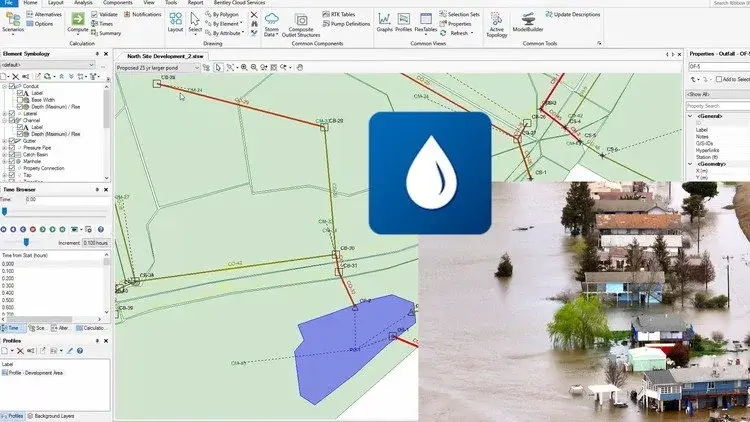
Beginner's guide to Bentley Open Flows Storm, applicable to StormCAD, Bentley Civil CivilStorm
What you'll learn:
StormCAD
Civil Storm
Storm water management
You will move one step further to design and analyze the system for optimal tailwater conditions and hydraulic jump occurrences.
Fundamental knowledge of how to lay out a storm sewer network
Build a model from ESRI Shapefile data
Requirements:
Basic knowledge about water management
Description:
This is a beginner's guide to Bentley Open Flows Storm. This course is applicable to both StormCAD and Bentley CivilStorm. It has three exercises where you can follow the video tutorial, utilize the attached resources, and practice well. About this sofwtware for water modeling and analysis software
You can analyze pressure and free-surface flow conditions for networks of channels and closed conduits, model complex pond outlets for a variety of tailwater conditions.
The software is specialized in design the most cost-effective pipe sizes and invert elevations and too for detect system bottlenecks, improve capacity, and limit stormwater flooding.
First exercise.
The student will obtain a fundamental knowledge of how to lay out a storm sewer network. Components to be placed in this user built model include: catchments, catch basins, pipes, junctions, and an outfall.
You will be stepped through the entry of storm data, Intensity Duration Frequency Curves (IDF), for various storm events. #... Once built, you will then analyze the system based on profile data, Flex Table output, and color coding visuals. Exercise Setup Network Layout Catchment Layout System DataStorm Data Batch Run and Review Results Annotation Review Exercise Second excercise.
You will move one step further to design and analyze the system for optimal tail water conditions and hydraulic jump occurrences.
Exercise SetupBackground and Prototypes Network Layout Entering Date Alternatives Scenarios Model Calculation Reviewing Results Third exercise.
Will teach how to build a model from ESRI Shapefile data.
It will take you step by step through the Model Builder wizard. After the model is built, it willl then step you through the entry of rainfall data for storm events. It will guide the you through the Terrain Extractor (TRex) tool to add surface elevations to the network. Finally, you will design and test the storm sewer system model for compliance against several design constraints.Exercise Setup Model Builder Data Input Trex Design Constraints and Calculation System RedesignScenario Comparison Exercise Review
Who this course is for:
Civil engineers
GIS users
Hidrology proffesionals
AutoCAD software users
Microstation software users
Published 4/2024
Created by ... Academy
MP4 | Video: h264, 1280x720 | Audio: AAC, 44.1 KHz, 2 Ch
Genre: eLearning | Language: English | Duration: 29 Lectures ( 2h 46m ) | Size: 980 MB
Download
🔒 Go Premium to Unlock
Beginner's guide to Bentley Open Flows Storm, applicable to StormCAD, Bentley Civil CivilStorm
What you'll learn:
StormCAD
Civil Storm
Storm water management
You will move one step further to design and analyze the system for optimal tailwater conditions and hydraulic jump occurrences.
Fundamental knowledge of how to lay out a storm sewer network
Build a model from ESRI Shapefile data
Requirements:
Basic knowledge about water management
Description:
This is a beginner's guide to Bentley Open Flows Storm. This course is applicable to both StormCAD and Bentley CivilStorm. It has three exercises where you can follow the video tutorial, utilize the attached resources, and practice well. About this sofwtware for water modeling and analysis software
You can analyze pressure and free-surface flow conditions for networks of channels and closed conduits, model complex pond outlets for a variety of tailwater conditions.
The software is specialized in design the most cost-effective pipe sizes and invert elevations and too for detect system bottlenecks, improve capacity, and limit stormwater flooding.
First exercise.
The student will obtain a fundamental knowledge of how to lay out a storm sewer network. Components to be placed in this user built model include: catchments, catch basins, pipes, junctions, and an outfall.
You will be stepped through the entry of storm data, Intensity Duration Frequency Curves (IDF), for various storm events. #... Once built, you will then analyze the system based on profile data, Flex Table output, and color coding visuals. Exercise Setup Network Layout Catchment Layout System DataStorm Data Batch Run and Review Results Annotation Review Exercise Second excercise.
You will move one step further to design and analyze the system for optimal tail water conditions and hydraulic jump occurrences.
Exercise SetupBackground and Prototypes Network Layout Entering Date Alternatives Scenarios Model Calculation Reviewing Results Third exercise.
Will teach how to build a model from ESRI Shapefile data.
It will take you step by step through the Model Builder wizard. After the model is built, it willl then step you through the entry of rainfall data for storm events. It will guide the you through the Terrain Extractor (TRex) tool to add surface elevations to the network. Finally, you will design and test the storm sewer system model for compliance against several design constraints.Exercise Setup Model Builder Data Input Trex Design Constraints and Calculation System RedesignScenario Comparison Exercise Review
Who this course is for:
Civil engineers
GIS users
Hidrology proffesionals
AutoCAD software users
Microstation software users
Published 4/2024
Created by ... Academy
MP4 | Video: h264, 1280x720 | Audio: AAC, 44.1 KHz, 2 Ch
Genre: eLearning | Language: English | Duration: 29 Lectures ( 2h 46m ) | Size: 980 MB
Download
🔒 Go Premium to Unlock